
AI is no longer just about adding a chatbot to your website.
Businesses are now building AI systems that can search internal documents, answer customer questions, analyze company data, update CRM records, prepare reports, and even carry out multi-step tasks with limited human involvement.
That creates an important question: should you build a RAG system or an AI agent?
The answer depends on what you actually need the AI to do.
The simplest way to understand the difference between RAG and AI agents is this:
RAG helps AI find the right information. AI agents help AI decide what to do and take action.
There is some overlap, and in many useful business applications, the two work together.
Here is how to decide what makes sense for your business in 2026.
What Is RAG?
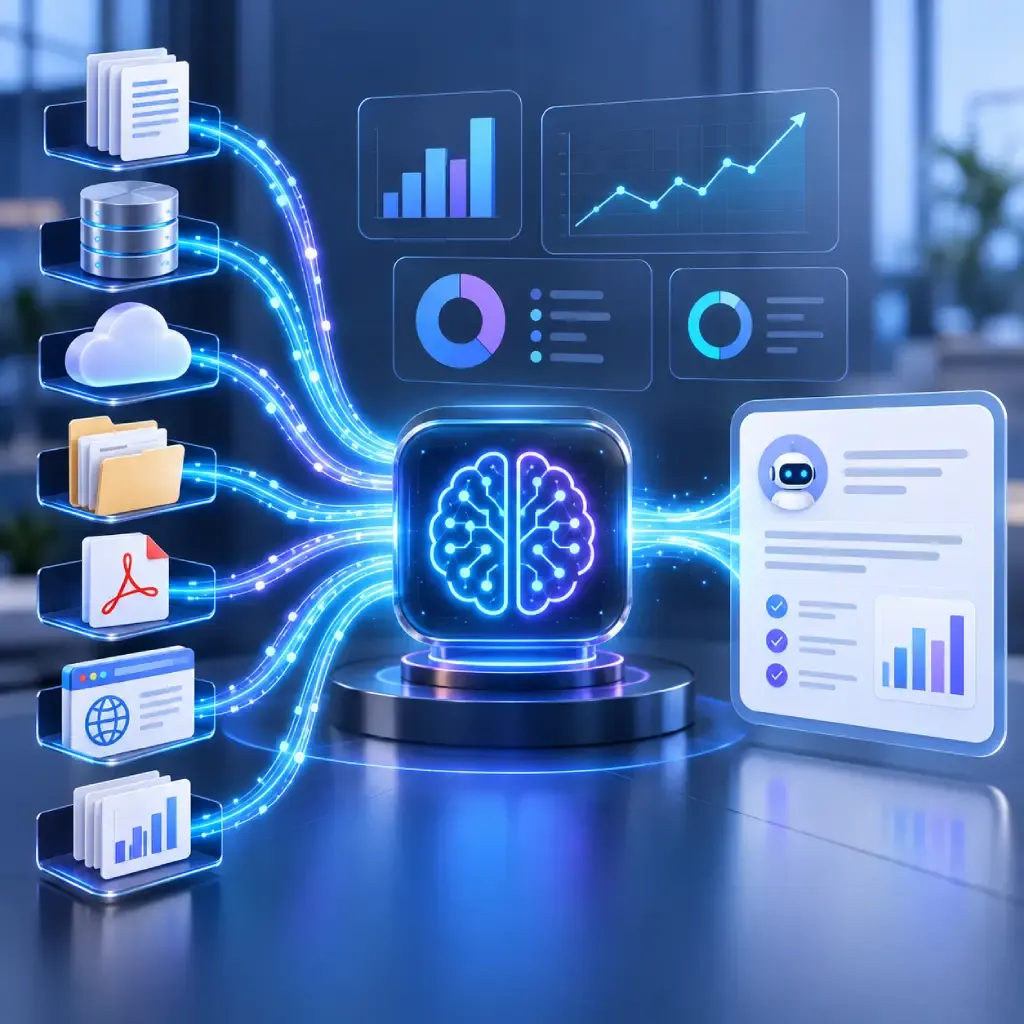
RAG stands for Retrieval-Augmented Generation.
A normal large language model answers based mainly on what it learned during training and whatever information you provide in the prompt.
RAG adds another step.
Before generating an answer, the system searches an external source such as:
- Company documents
- Product manuals
- PDFs
- Policies
- Knowledge bases
- Support tickets
- Website content
- Internal databases
It retrieves the most relevant information and gives that context to the language model before the model answers.
So instead of expecting an AI model to somehow “know” your refund policy, employee handbook, technical documentation, or latest product information, RAG lets it look that information up when needed.
A simple RAG example
Imagine an insurance company with thousands of policy documents.
A customer asks:
“Does my policy cover accidental water damage?”
Instead of giving a generic answer, a RAG system can find the relevant section of that customer’s policy and use it to create a grounded response.
That makes RAG especially useful when accuracy depends on information that is private, frequently updated, or specific to your organization.
If you are still deciding how AI fits into a product, our guide to building AI applications with LLMs covers some of the broader architecture and product decisions worth considering first.
What Are AI Agents?
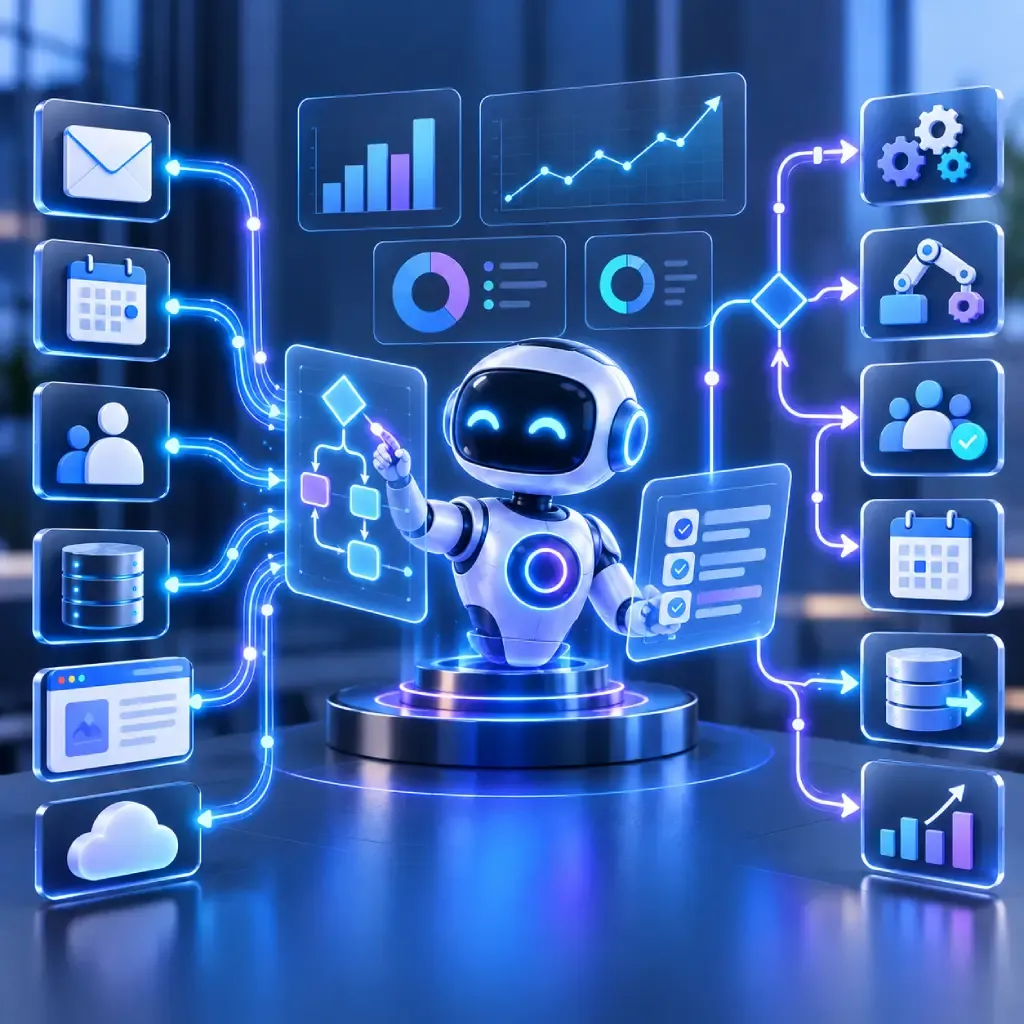
AI agents go a step further.
An agent doesn’t just retrieve information and respond. It can reason about a goal, decide which tools it needs, perform actions, review the results, and continue until the task is complete.
Think of the difference this way.
A RAG system might tell a sales manager:
“ABC Manufacturing has three overdue follow-ups in the CRM.”
An AI agent could:
- Check the CRM.
- Find overdue leads.
- Review previous conversations.
- Draft personalized follow-up emails.
- Ask the salesperson for approval.
- Send the approved emails.
- Update each CRM record.
- Schedule another follow-up if there is no response.
The key difference is action.
AI agents can interact with tools such as CRMs, email systems, databases, calendars, APIs, ERP platforms, and other business applications.
That is why agents are becoming particularly interesting for business automation.
If you’re comparing agents with more traditional automation, our guide on AI agents vs workflow automation explains where each approach works best.
The Difference Between RAG and AI Agents
The biggest mistake is treating RAG and agents as competing versions of the same technology.
They solve different problems.
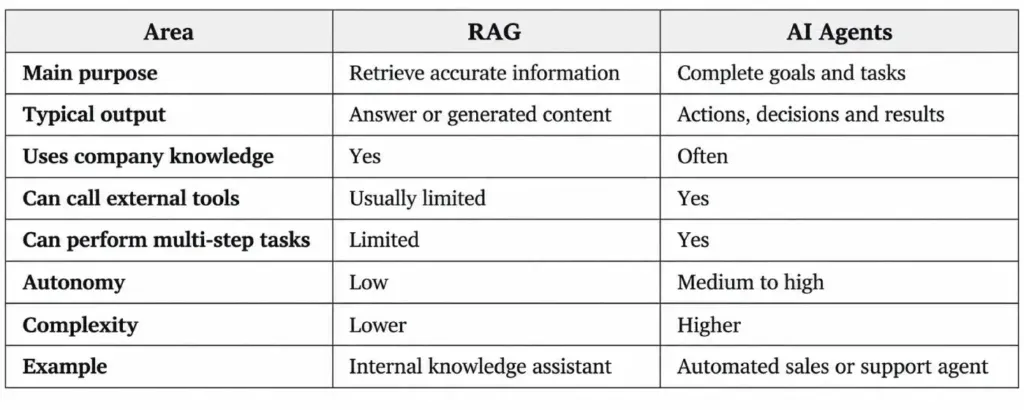
A useful shortcut is:
If your main problem is “the AI needs access to our information,” think RAG.
If your main problem is “the AI needs to perform work,” think AI agents.
That distinction can save a lot of unnecessary development.
Not every business needs an autonomous agent.
Sometimes a well-built RAG application solves the problem with less complexity, lower cost, and easier oversight.
RAG vs AI Agents: When Should You Use RAG?

RAG makes sense when employees or customers regularly need answers from a large amount of business information.
1. Internal knowledge assistants
Employees constantly ask questions such as:
- What is our leave policy?
- How does this internal process work?
- Where is the latest sales document?
- What are the technical requirements for this product?
A RAG-powered assistant can search internal documents and answer those questions without employees manually digging through folders.
2. Customer support
RAG can help support systems answer questions based on product manuals, FAQs, troubleshooting documentation, warranties, policies, and previous support material.
3. Legal and compliance information
Organizations dealing with contracts, regulations, policies, or compliance documentation can use RAG to make large document libraries easier to search.
Human review may still be required for important decisions, but finding relevant information becomes much faster.
4. Product documentation
Software companies can build assistants that answer developer or customer questions using their current documentation.
5. Research-heavy applications
RAG also works well when users need answers grounded in specific reports, articles, databases, or internal research.
In short, choose RAG when better access to trusted knowledge is the main goal.
When Does Your Business Need AI Agents?

AI agents start making sense when retrieving information is only one part of the job.
Consider a customer service request:
“I haven’t received my order. Can you check it and arrange a replacement if it has been lost?”
A RAG system can explain your replacement policy.
An agent could potentially:
- Identify the customer.
- Retrieve the order.
- Check shipping status.
- Read the replacement policy.
- Determine whether the order qualifies.
- Create a replacement order.
- Update the support ticket.
- Notify the customer.
That’s a fundamentally different system.
Common AI agent use cases
Businesses are exploring agents for:
Sales
Agents can qualify leads, research prospects, update CRM records, draft follow-ups, and schedule meetings.
Customer support
An agent can investigate a problem across several systems rather than simply answering a FAQ.
Finance
Agents can collect information from invoices, ERP systems, spreadsheets, and accounting applications before preparing reports or flagging anomalies.
HR
Agents can help with onboarding, document collection, employee queries, interview coordination, and routine HR workflows.
Operations
Agents can monitor systems, detect exceptions, gather information, notify the right person, and start predefined corrective actions.
Businesses interested in testing these ideas without building an entire platform from scratch can also explore creating AI agents with n8n.
Do You Actually Need to Choose Between RAG and AI Agents?
Often, no.
Some of the most useful business AI systems combine them.
An agent may need RAG to find accurate information before deciding what action to take.
Imagine an AI procurement agent.
A user says:
“Find the best supplier for this order and prepare the purchase request.”
The agent might:
- Retrieve approved supplier policies using RAG.
- Query supplier pricing through an API.
- Check previous purchase history.
- Compare available options.
- Apply company procurement rules.
- Prepare a purchase request.
- Send it to a manager for approval.
Here, RAG provides knowledge while the agent provides reasoning and action.
This combination is increasingly important because business agents should not simply invent rules or rely on general model knowledge. They need access to the actual information that governs the business.
If you’re looking at more advanced agent architecture, our OpenClaw architecture guide explores how scalable agent systems can be structured.
How to Decide What Your Business Should Build
Don’t start by asking:
“Should we build RAG or an AI agent?”
Start with the business problem.
Ask what the AI needs to do
If employees mainly need faster answers from existing company information, RAG may be enough.
If the system needs to make decisions and interact with other software, you’re moving toward an agent.
Look at the number of systems involved
A knowledge assistant may only need access to your document library.
An agent could require connections to:
- CRM
- ERP
- Calendar
- Payment systems
- Databases
- Customer support tools
- Internal APIs
Every integration introduces more engineering, permissions, security considerations, and testing.
Think about the risk of a wrong action
A wrong answer is one thing.
A wrong action is different.
If an AI incorrectly answers a question, a user may correct it.
If an autonomous agent sends money, changes an order, deletes data, or emails a customer, the consequences can be much larger.
That means higher-risk agents need approval layers, access controls, audit logs, monitoring, and clear limits on what they are allowed to do.
Start with a narrow workflow
Businesses sometimes try to build a “company-wide autonomous AI agent” before proving one useful workflow.
A better starting point is usually something specific:
“Help support staff investigate refund requests.”
Or:
“Research inbound leads and prepare CRM records.”
You can measure whether it works before giving the system more responsibility.
Our guide on measuring AI ROI can help you connect AI projects to actual business outcomes rather than judging success by how impressive the demo looks.
What Should Businesses Build in 2026?
For many companies, the sensible path is incremental.
Start with RAG when your biggest problem is accessing scattered business information.
Move toward AI agents when the system needs to interact with tools and complete parts of a workflow.
Combine RAG + agents when an agent needs reliable internal knowledge before taking action.
What you shouldn’t do is choose an architecture simply because “AI agents” are getting attention.
Architecture should follow the use case.
A relatively simple RAG assistant that employees actually use is much more valuable than an ambitious autonomous agent that nobody trusts enough to put into production.
And if you’re planning a larger AI initiative, choosing the right development team matters just as much as selecting the model or framework. Our guide on how to find the right AI development company covers the questions worth asking before you commit.
Frequently Asked Questions
What is the main difference between RAG and AI agents?
The main difference between RAG and AI agents is their purpose. RAG retrieves relevant information and gives it to an AI model so it can generate a better answer. AI agents can reason about a goal, use tools, make decisions, and take actions across one or more systems.
Is RAG an AI agent?
Not by itself.
RAG is a method for retrieving external knowledge and using it to improve an AI model’s response. However, RAG can be one component inside an AI agent.
Can an AI agent use RAG?
Yes. In fact, this is often a useful architecture.
An AI agent may use RAG to retrieve company policies, documents, customer information, or other knowledge before deciding what it should do next.
Are AI agents more expensive than RAG systems?
Usually, AI agents are more complex to build and operate because they may involve multiple model calls, external tools, integrations, memory, monitoring, and security controls.
The actual cost depends on the workflow, model, volume of usage, and integrations involved.
Should a small business use RAG or AI agents?
Start with the problem rather than the technology.
If your employees spend too much time searching for information, RAG may deliver value quickly. If they spend hours moving information between systems or performing repetitive multi-step work, an AI agent may be worth exploring.
Final Thoughts
The RAG vs AI Agents discussion becomes much easier once you stop treating it as a technology contest.
RAG is mainly about giving AI access to the right knowledge.
AI agents are about giving AI the ability to pursue a goal and take action.
And in many real business systems, you will eventually use both.
The right starting point is to identify one expensive, repetitive, or frustrating business problem and work backward from there.
If you’re exploring RAG, AI agents, or a combination of both, Think To Share can help you evaluate the use case, map the architecture, build the integrations, and turn the idea into a production-ready AI application.
Have an AI use case in mind? Start with the workflow, not the buzzword.
