A potential patient sends a WhatsApp message asking about a skin treatment, dental consultation, blood test, or health package. What happens next?
In many clinics, the message sits unanswered until someone from reception becomes available. The staff member then explains the services, checks the appointment calendar, collects the patient’s information, sends a booking link, and remembers to follow up later.
That process may work when enquiries are limited. However, once a clinic starts receiving dozens of messages every day, leads are easily missed.
This funnel creation guide for clinics and diagnostics centers in GHL explains how to connect landing pages, WhatsApp conversations, appointment calendars, CRM pipelines, and automated follow-ups into one structured patient journey.
We will also use an automated booking system created for AestheticQ as a practical example.
Direct answer: To create funnels in GHL for a clinic, build a service-specific landing page, collect the patient’s details, connect an appointment calendar, trigger WhatsApp workflows, move the lead through a CRM pipeline, and automatically follow up when an appointment is not booked.
Why Clinics Need More Than a Basic Landing Page
A landing page alone does not create a complete patient acquisition system.
Someone may visit the page, look at the available treatments, and leave without booking. Another person may click the WhatsApp button but stop responding midway. A third person may book successfully but forget the appointment.
A proper healthcare funnel should manage all three situations.
For most clinics and diagnostics centers, the funnel should:
- Capture enquiries from websites, advertisements, forms, and WhatsApp.
- Present the right services to each patient.
- Collect essential contact information.
- offer available appointment slots.
- Confirm the booking automatically.
- Send reminders before the appointment.
- Follow up with people who did not complete the booking.
- Update the lead’s status inside the CRM.
HighLevel describes funnels as a direct sequence of pages designed for a specific objective, such as generating leads or booking appointments. Funnels can currently be built from scratch, from templates, or with its AI-assisted builder.
Understanding the Two Parts of a GHL Clinic Funnel
One common mistake is to think that the funnel is only the page visible to the patient.
In practice, an effective GHL clinic funnel has two connected parts.
The patient-facing funnel
This includes the pages and forms patients interact with:
- Service or campaign landing page
- Treatment information page
- Enquiry or qualification form
- Appointment calendar
- Booking confirmation page
The back-end automation
This is what happens after the patient submits a form or sends a WhatsApp message:
- A contact record is created or updated.
- The lead enters the clinic’s CRM pipeline.
- A WhatsApp message presents the available services.
- The patient receives the appropriate booking option.
- The opportunity stage changes after booking.
- Follow-up messages are sent when no booking occurs.
- The lead is removed from the nurture workflow after an appointment is confirmed.
This combination turns a static webpage into a working booking system.
Step 1: Map the Patient Journey Before Building
Before learning how to create funnels in GHL, decide what the patient should experience from the first enquiry to the final appointment.
For AestheticQ, the journey begins when someone contacts the clinic through WhatsApp. The automation then presents the available service groups, such as skin, hair, dental, and Ayurveda.
After the patient chooses a service, the system guides them towards the relevant appointment calendar. When the appointment is booked, the lead is moved into the appropriate CRM stage.
When the patient does not book, a separate follow-up workflow continues the conversation.
A diagnostics center could use a similar structure:
- Blood tests
- Full-body check-up packages
- Imaging and scans
- Home sample collection
- Doctor-recommended tests
- Corporate health packages
The goal is to avoid sending every patient through the same generic journey. Someone looking for a dental consultation should not receive the same questions as someone arranging a home blood collection.
Step 2: Create the Funnel Pages in GHL
Inside the GHL sub-account, go to:
Sites → Funnels → New Funnel
You can begin with a blank funnel, select a template, or use the available AI creation option. After choosing the starting point, create a simple sequence of pages focused on one conversion goal.
Page 1: Service-specific landing page
Create separate pages for major services rather than placing every clinic offering on one crowded page.
For example:
- Skin treatment consultation
- Hair loss assessment
- Dental appointment
- Ayurveda consultation
- Diagnostic health package
- Home sample collection
Each page should clearly answer:
- What is the service?
- Who is it suitable for?
- What happens during the consultation?
- Why should the patient trust the clinic?
- What should the visitor do next?
Use one clear call-to-action, such as Book an Appointment, Check Available Slots, or Talk to Our Clinic Team on WhatsApp.
Page 2: Patient enquiry form
Keep the initial form short. Asking too many questions can discourage people from completing it.
Start with:
- Full name
- Mobile number
- Email address, when required
- Preferred service
- Preferred location
- Preferred appointment date
GHL currently allows forms and surveys to be created or edited directly from the funnel and website builder.
Medical history, symptoms, prescriptions, and other sensitive information should only be collected when genuinely necessary and through an appropriately secured process.
Page 3: Appointment calendar
Connect each service to the correct calendar, practitioner, department, or location.
A multi-speciality clinic may have different calendars for:
- Skin specialists
- Hair consultants
- Dentists
- Ayurveda practitioners
- Laboratory appointments
- Home collection teams
Separating calendars makes routing easier and prevents the wrong team from receiving a booking.
Page 4: Confirmation page
After booking, show a confirmation page containing:
- Appointment date and time
- Clinic address
- Contact number
- Preparation instructions
- Rescheduling information
- What the patient should bring
The same information can also be sent through WhatsApp.
Step 3: Build the Initial WhatsApp Workflow
In the AestheticQ system, the first workflow starts when a contact replies through WhatsApp.
The automation then checks whether the contact is already part of an active service journey. Eligible leads are assigned to a team member, added to the opportunity pipeline, placed into a short wait step, and sent the first WhatsApp message.
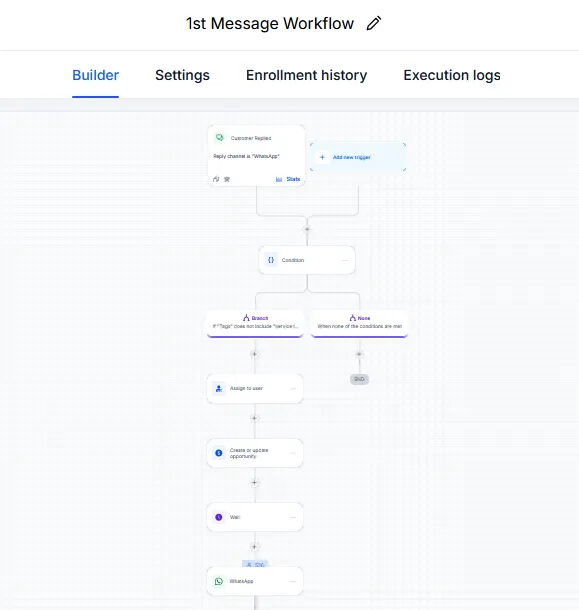
Figure 1: The initial workflow starts after a WhatsApp reply and prepares the lead for service selection.
The first message should be simple and easy to respond to. Instead of asking the patient to type a long explanation, present a clear selection of services.
For example:
Hello {{contact.first_name}}, thank you for contacting AestheticQ.
Please choose the service you would like to explore, and our automated assistant will guide you to the appropriate appointment option.
The patient can then select Skin, Hair, Dental, Ayurveda, or another available service.
HighLevel’s WhatsApp workflow integration supports reply-driven sequences, branching logic, wait actions, and subsequent workflow steps based on the patient’s response.
Step 4: Create Different Branches for Different Services
A clinic may offer many services, but the automation should still feel relevant to the individual patient.
The AestheticQ first-message workflow uses multiple branches. Each branch updates the contact, adds the person to the relevant workflow, sends WhatsApp messages, waits for a response, and creates or updates the opportunity record.
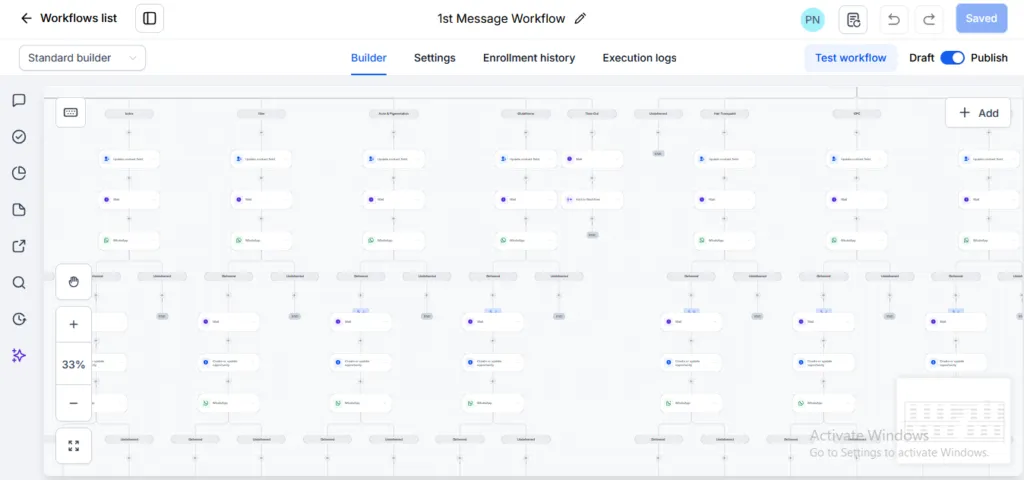
Figure 2: Different workflow branches route patients according to their selected service.
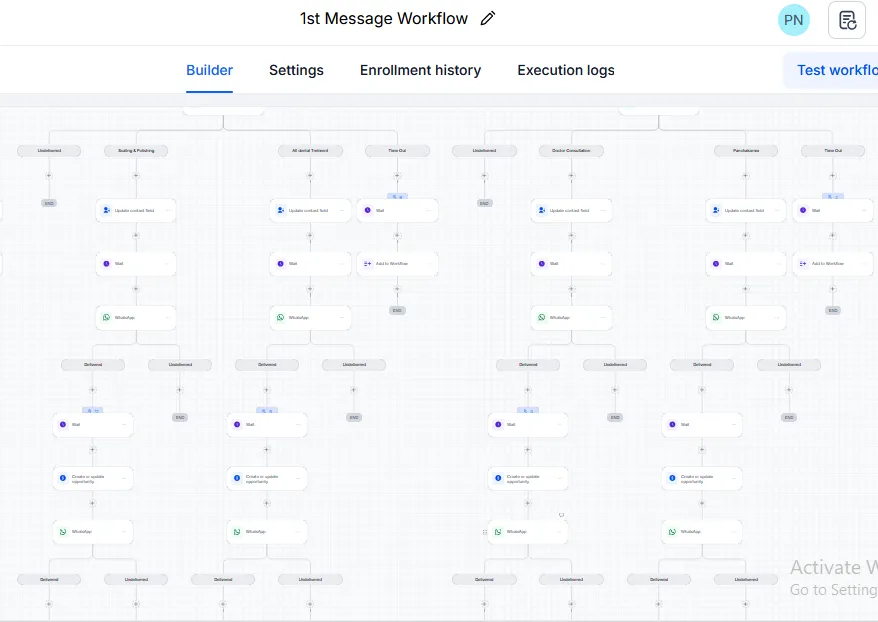
Figure 3: The expanded automation shows how multiple services can be managed within one structured system.
Avoid building one enormous workflow unless the logic is easy to maintain. A more manageable approach is to use an initial routing workflow and connect it to smaller service-specific workflows.
This makes it easier to change the message, appointment calendar, delay, or follow-up schedule for one department without affecting every other service.
Step 5: Automate Service-Specific Appointment Workflows
Once a patient chooses a service and books an appointment, a dedicated workflow should take over.
The AestheticQ implementation uses separate workflows for skin, hair, dental, and Ayurveda appointments.
Skin appointment workflow
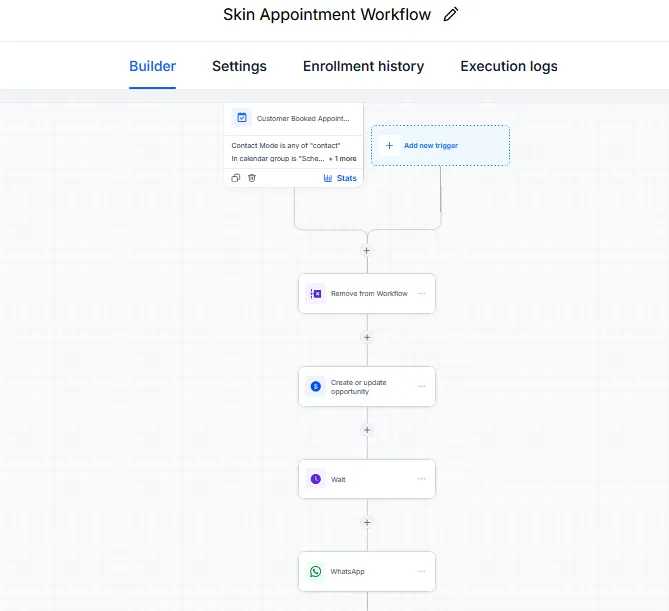
Figure 4: The skin appointment workflow is triggered after a customer books through the relevant calendar.
Hair appointment workflow
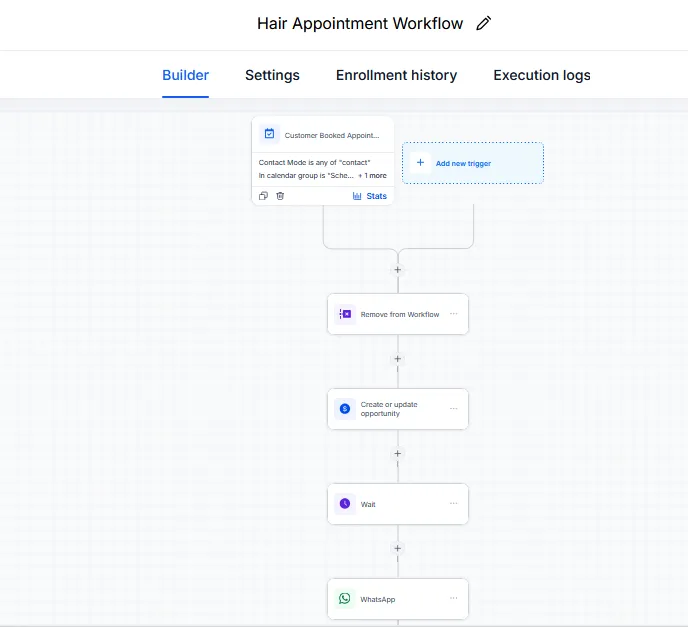
Figure 5: Hair treatment enquiries are transferred to a dedicated appointment workflow.
Dental appointment workflow
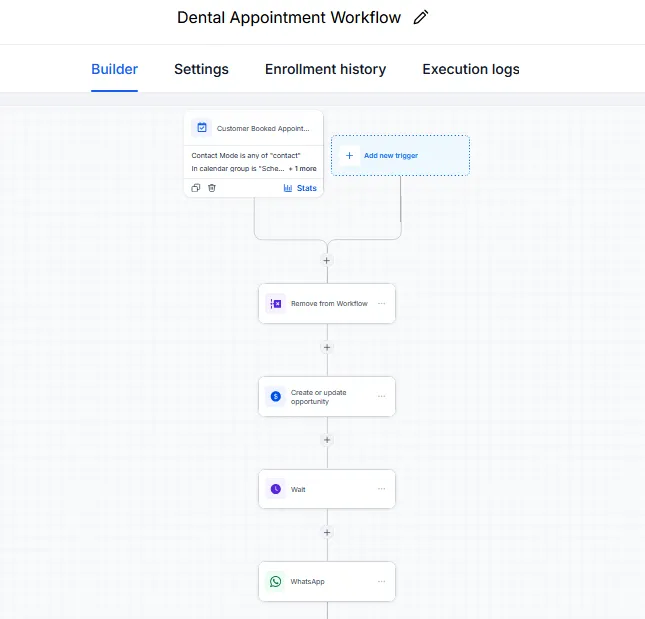
Figure 6: The dental appointment workflow updates the opportunity and sends the required WhatsApp communication.
Ayurveda appointment workflow
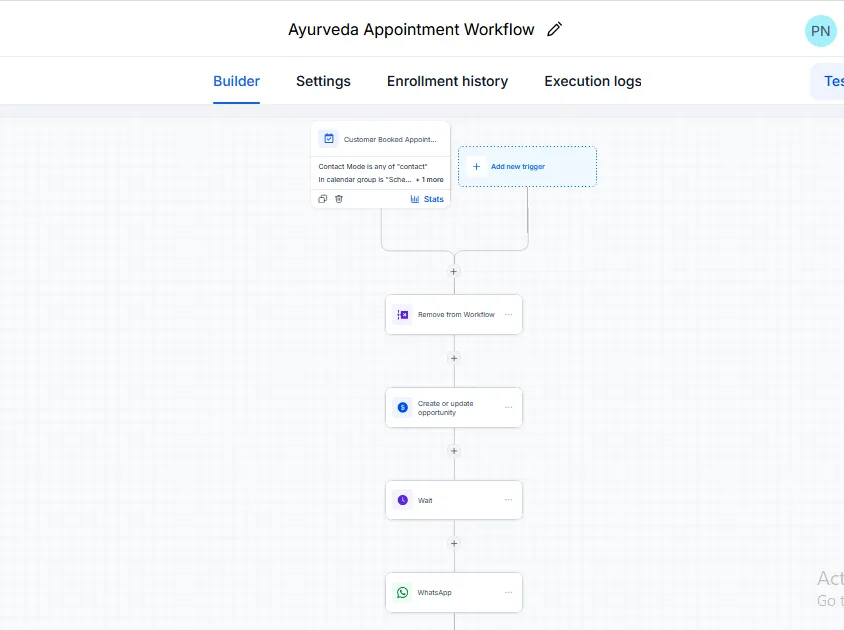
Figure 7: Ayurveda bookings are managed through a separate calendar-based workflow.
Although the services are different, the underlying structure remains consistent:
- The customer books an appointment.
- The contact is removed from the previous nurture workflow.
- The opportunity record is created or updated.
- The system waits for the configured period.
- A WhatsApp confirmation or reminder is sent.
The customer-booked-appointment trigger and appointment-status triggers can be used to start workflows when an appointment is booked, rescheduled, cancelled, or marked as a no-show.
For a diagnostics center, the same model could be adapted for different test categories or collection methods.
Step 6: Add a Follow-Up Workflow for Patients Who Do Not Book
Not every patient books during the first conversation.
Some are comparing prices. Some need to speak with a family member. Others become busy and forget to return.
This is where a follow-up sequence becomes valuable.
The AestheticQ lead follow-up workflow sends a WhatsApp message, checks whether it was delivered, waits for a defined period, and sends the next follow-up when appropriate.
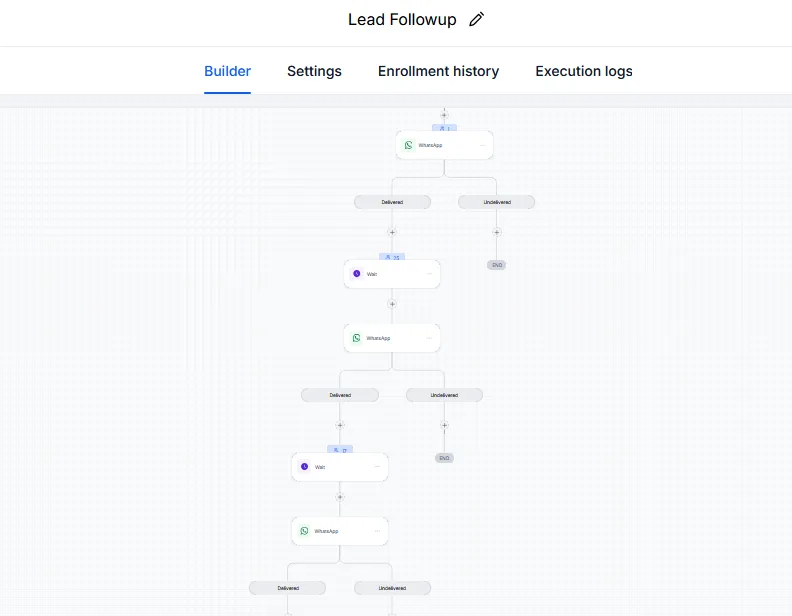
Figure 8: The follow-up workflow continues nurturing the lead while monitoring message delivery.
A practical follow-up sequence could include:
First follow-up: A helpful reminder with the booking link.
Second follow-up: A short explanation of the consultation process or treatment benefit.
Third follow-up: An invitation to ask questions or speak with the clinic team.
Do not send the same promotional message repeatedly. Each message should add value and make the next step easier.
GHL can branch workflow actions according to WhatsApp delivery status, allowing a clinic to separate delivered and undelivered messages and define the appropriate next action.
Step 7: Track Every Enquiry in the Opportunity Pipeline
Automation should make the clinic team more organised, not hide information from them.
In the AestheticQ setup, enquiries are displayed in a visual opportunity pipeline with stages such as:
- New Lead
- Appointment Booked
- Follow Up or Nurture
- Closed
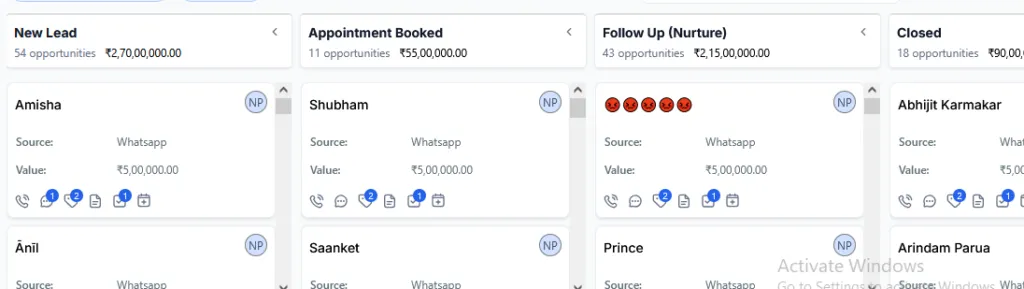
Figure 9: The opportunity board gives the clinic team a real-time view of lead status and potential value.
Receptionists and managers can quickly see:
- How many new enquiries have arrived
- Who has booked an appointment
- Which patients still need follow-up
- Which opportunities have been closed
- The source of each lead
- The estimated value of opportunities
This is particularly helpful when leads arrive from WhatsApp, Facebook advertisements, Google Ads, landing pages, referrals, and phone calls at the same time.
How to Improve Funnel Conversion Over Time
Publishing the funnel is not the final step. Clinics should review how patients move through it and identify where they stop.
Monitor:
- Landing page views
- Form completion rate
- WhatsApp response rate
- Appointment-booking rate
- Cost per enquiry
- Cost per confirmed appointment
- No-show rate
- Follow-up conversion rate
- Conversion rate by service
- Conversion rate by lead source
GHL’s site and funnel analytics can be used to review page views and step-level performance across funnels, forms, websites, surveys, and related assets.
Small changes often improve results. You may shorten the form, rewrite the first WhatsApp message, reduce the delay before follow-up, simplify service choices, or create a separate page for a high-demand treatment.
For further reading, connect this article internally to Think To Share’s guide on AI agents vs workflow automation and its overview of business tasks that can be automated.
Common Funnel Creation Mistakes Clinics Should Avoid
Sending every lead through the same workflow
Different services may require different staff members, calendars, questions, and preparation instructions.
Asking for too much information too early
The first objective is to begin the conversation or secure the appointment. Detailed information can be collected later when appropriate.
Continuing promotional follow-ups after booking
Once an appointment is confirmed, remove the patient from the general nurture sequence and transfer them to the appointment-confirmation workflow.
Ignoring failed WhatsApp delivery
Create an undelivered branch so the team can verify the number or use another approved communication channel.
Building automation without human escalation
Patients may ask clinical, urgent, or complex questions that should not be answered by a generic automated message. Include a clear path to a staff member.
Failing to test every branch
Test the workflow as a new lead, returning lead, booked patient, unresponsive patient, cancelled appointment, and undelivered WhatsApp contact before publishing it.
Frequently Asked Questions
How do I create funnels in GHL for a clinic?
Go to Sites → Funnels, create a blank funnel or select a template, add a service page, form, appointment calendar, and confirmation page. Then connect the funnel to workflows that send WhatsApp messages, update opportunities, and manage follow-ups.
Can GHL book clinic appointments through WhatsApp?
Yes. A WhatsApp conversation can guide the patient towards a booking calendar, and HighLevel also supports guided WhatsApp appointment flows for eligible configurations.
Should every clinic service have a separate funnel?
Not necessarily. Related services can share one funnel, but high-demand services usually perform better with dedicated pages, messages, and appointment calendars.
What happens when a patient does not book?
The contact can be moved into a nurture stage and enrolled in an automated follow-up workflow. The sequence should stop as soon as the patient books or requests no further messages.
Can diagnostics centers use the same system?
Yes. The structure can be adapted for diagnostic packages, laboratory tests, scans, health check-ups, home sample collection, report enquiries, and corporate health programmes.
Conclusion
A successful healthcare funnel does more than collect contact details. It gives patients a clear path from enquiry to appointment while helping clinic staff manage every lead without repetitive manual work.
The AestheticQ example demonstrates how WhatsApp service selection, appointment workflows, follow-up automation, and CRM pipeline management can work together inside GHL.
When implemented carefully, the result is a faster response process, more consistent follow-up, better visibility for the clinic team, and a smoother booking experience for patients.
To build a similar system for your clinic or diagnostics center, contact Think To Share and discuss a customised GHL funnel and WhatsApp automation workflow.
