
Today we’re exploring a tool that has fundamentally changed how our development team writes software, and it’s one we now consider as essential as version control itself.
Yes, we’re discussing GitHub Copilot, the AI-powered coding assistant built by GitHub in partnership with OpenAI and other leading model providers. While there’s no shortage of AI coding tools on the market in 2026, Copilot remains the one with the largest installed base and the deepest integration into the workflows most developers already use.
In this GitHub Copilot guide, we’ll walk through what the tool actually does, how to use GitHub Copilot step by step, what it costs, and the practical habits that separate teams who get real value from those who just generate noise. By the end, you’ll know exactly whether it belongs in your workflow and how to set it up if it does.
Let’s start with the fundamentals.
What Is GitHub Copilot?
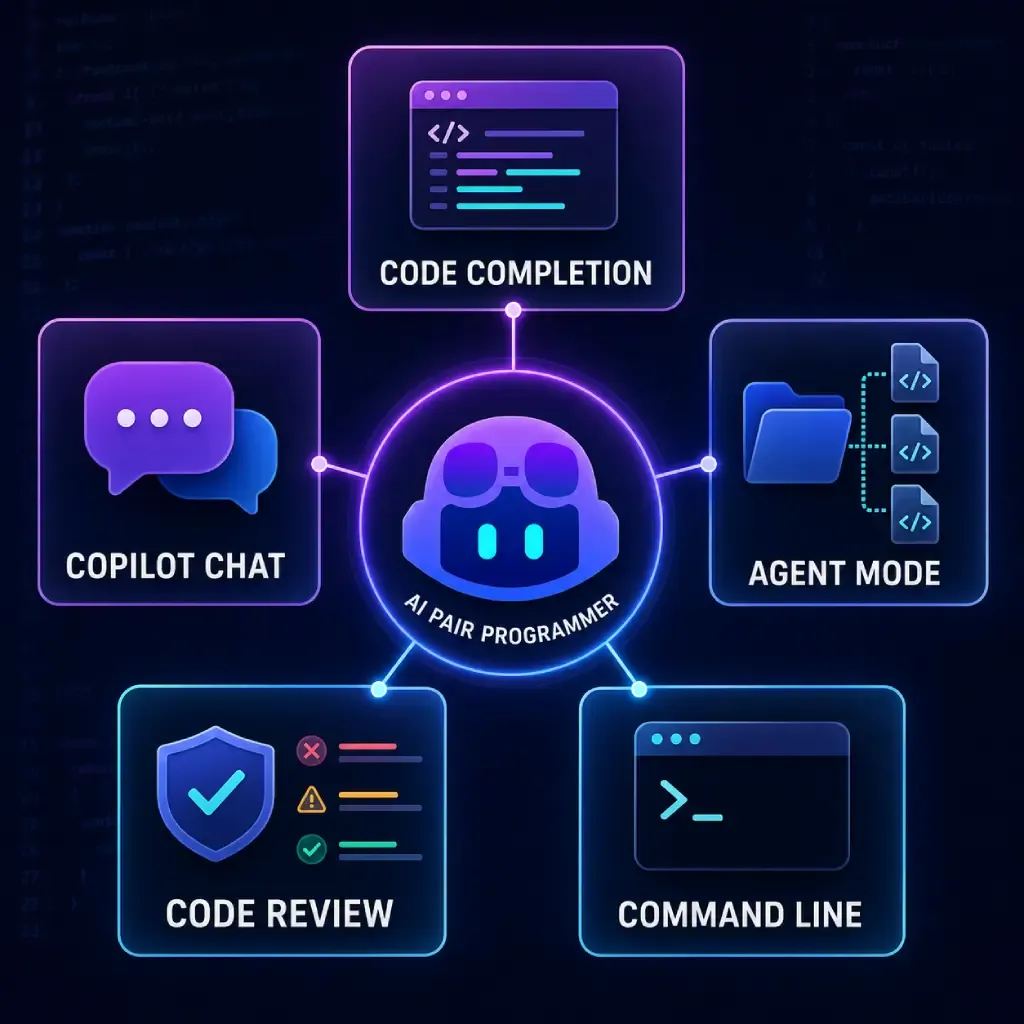
GitHub Copilot is an AI pair programmer that lives inside your code editor. As you type, it suggests entire lines, functions, and blocks of code based on the context of your project your file names, your comments, your existing code, and even your open tabs.
But describing Copilot as “autocomplete on steroids” undersells what it has become. The modern version of the tool includes several distinct capabilities:
- Inline code completionsthat predict what you’re about to write
- Copilot Chat, a conversational assistant that explains code, fixes bugs, and answers questions inside your editor
- Agent mode, which can take a task description and work across multiple files to complete it
- Code review assistancethat flags issues in pull requests before a human reviewer sees them
- A command-line interfacefor developers who prefer working in the terminal
For teams evaluating AI investments more broadly, this range matters. Copilot isn’t a single feature you adopt it’s a spectrum of assistance, from lightweight suggestions to semi-autonomous task completion. We’ve covered how to evaluate these kinds of investments in our guide to measuring AI ROI, and Copilot is one of the cleanest examples of a tool where the returns are genuinely measurable.
How GitHub Copilot Works Under the Hood
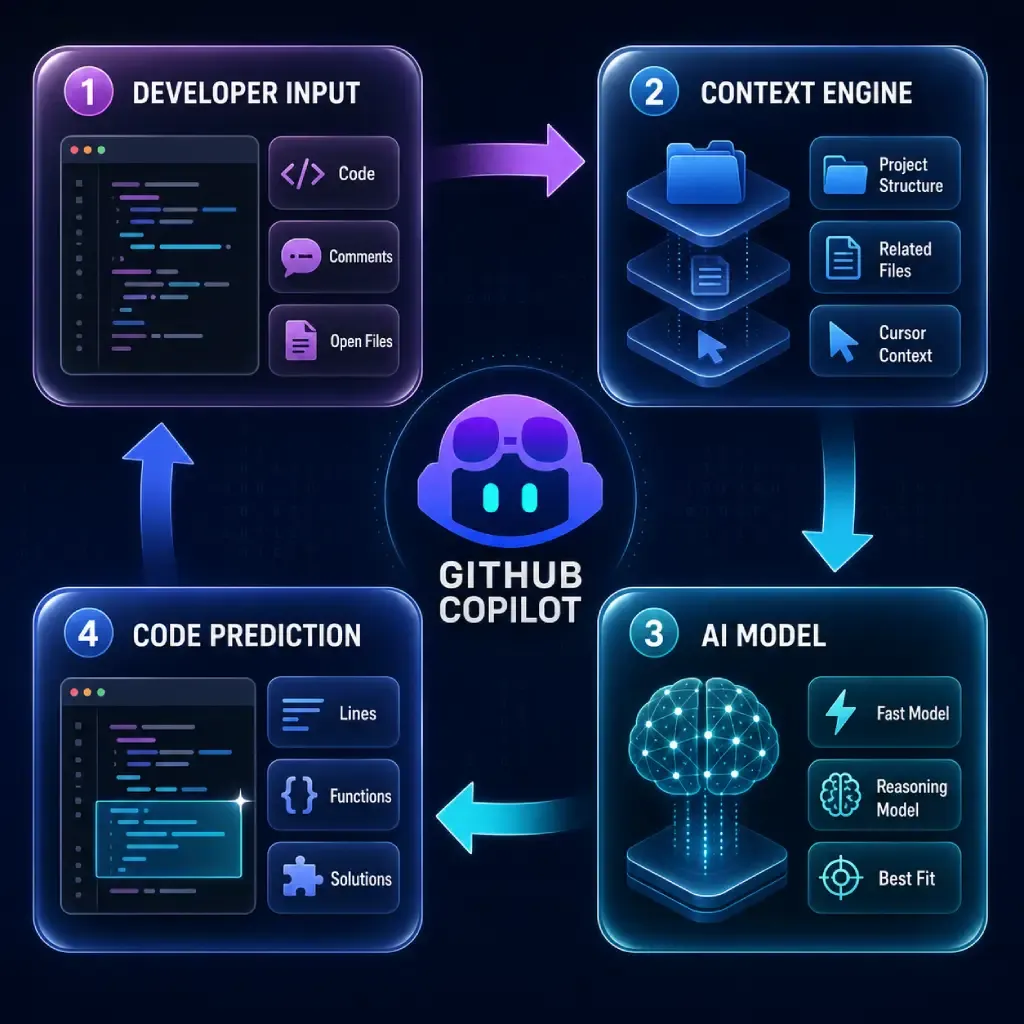
Copilot is powered by large language models trained on billions of lines of publicly available code. When you write in your editor, the tool sends your surrounding context to the model, which predicts the most likely useful continuation.
What makes this practical rather than gimmicky is the context engine. Copilot doesn’t just look at your cursor position it considers your project structure, related files, and the natural-language comments you write. A comment like // validate email format and return a helpful error is often enough to generate a complete, working function.
Since 2025, Copilot has also let developers choose between multiple underlying AI models, including options from OpenAI, Anthropic, and Google, so teams can pick the model that best fits a given task. Simpler completions stay fast and lightweight, while complex reasoning tasks can call on more powerful models.
How to Use GitHub Copilot: A Step-by-Step Walkthrough
Getting started takes about ten minutes. Here’s the process we recommend to every developer we onboard.
Step 1: Choose a Plan and Sign Up
Head to GitHub’s Copilot page and pick a tier. There’s a free plan that lets you evaluate the tool with no card on file, and individual paid plans starting at $10 per month. We’ll break down pricing in more detail below. Tech Jacks SolutionsValue Add VC
Step 2: Install the Extension
Copilot works in Visual Studio Code, JetBrains IDEs, Visual Studio, Neovim, and Xcode. In VS Code, open the Extensions panel, search for “GitHub Copilot,” install it, and sign in with your GitHub account. That’s genuinely all there is to it.
Step 3: Start With Comments and Completions
The fastest way to learn Copilot’s rhythm is to write a descriptive comment and pause. Watch the ghost-text suggestion appear, then press Tab to accept or keep typing to refine. Within an hour, you’ll develop an instinct for when to trust it.
Step 4: Graduate to Chat and Agent Mode
Once completions feel natural, open Copilot Chat and try prompts like “explain this function,” “write unit tests for this file,” or “refactor this to remove duplication.” For larger tasks say, adding a new API endpoint agent mode can plan and execute the change across your codebase while you review its work.
Step 5: Review Everything
This is the step that separates professionals from hobbyists. Copilot’s suggestions are drafts, not verdicts. Read every line before you commit it, exactly as you would with code from a new team member.
GitHub Copilot Pricing in 2026: What Changed
Pricing is where this GitHub Copilot guide needs to be current, because the model changed significantly this year.
On June 1, 2026, GitHub switched from its flat premium-request system to usage-based billing built on AI Credits. Inline code completions and next-edit suggestions remain unlimited on paid plans, but Chat, agent mode, code review, and the CLI now draw from a monthly credit pool.
The current lineup looks like this: Free ($0), Pro at $10/month, Pro+ at $39/month, and Max at $100/month for individuals, plus Business at $19 per seat and Enterprise at $39 per seat for organizations. Each paid individual tier bundles a fixed credit allowance Pro includes $15 in monthly credits, Pro+ includes $70, and Max includes $200.
The practical takeaway: if you mostly use completions, the $10 Pro plan is still excellent value. If you lean heavily on agents and premium models, budget for the credits your actual usage consumes, not just the sticker price. For smaller teams weighing this decision, we’ve written a dedicated breakdown of GitHub Copilot for small businesses that walks through the cost math in detail.
Best Practices We’ve Learned From Daily Use
After years of running Copilot across client projects, a few habits consistently improve results.
Write intent-rich comments. The clearer your comment, the better the suggestion. “Sort users” produces generic code; “sort users by last login date, most recent first, treating null as oldest” produces exactly what you need.
Keep relevant files open. Copilot reads your open tabs for context. Working on a feature? Open the related model, service, and test files first.
Use it for the boring 60%. Boilerplate, tests, data transformations, and documentation are where Copilot shines brightest. Save your own focus for architecture and business logic.
Never skip security review. AI-generated code can reproduce insecure patterns. Run your normal linting, scanning, and review processes on everything.
Measure the impact. Track cycle time, pull request throughput, or developer satisfaction before and after adoption so you can justify the spend with data rather than vibes.
Frequently Asked Questions
Is GitHub Copilot free?
Partially. There’s a free tier with limited completions and chat interactions, which is enough to evaluate the tool. Sustained professional use requires a paid plan starting at $10/month.
Does GitHub Copilot replace developers?
No and after years of daily use, we’re confident saying it won’t. Copilot accelerates the mechanical parts of coding, but deciding what to build, how systems should fit together, and whether generated code is actually correct remains entirely human work.
Can GitHub Copilot write an entire application?
Agent mode can scaffold surprisingly complete features from a description, but production applications still need human architecture, review, and judgment. Think of it as a fast junior developer, not a replacement engineering team.
Is my code sent to GitHub’s servers?
Yes — context from your editor is sent to generate suggestions. Business and Enterprise plans include policcontrols, IP indemnity options, and settings to exclude your code from training. Review your organization’s data policies before rolling it out.
Which editors support GitHub Copilot?
VS Code, Visual Studio, JetBrains IDEs (IntelliJ, PyCharm, WebStorm, and others), Neovim, Xcode, and the terminal via Copilot CLI.
Final Thoughts: Should You Adopt Copilot?
For most development teams in 2026, the question is no longer whether to use AI assistance it’s how to use it well. GitHub Copilot remains the most frictionless entry point because it meets developers inside the tools they already use, with a free tier that makes evaluation risk-free.
Start small: install it, spend a week on completions, then expand into chat and agents as trust builds. Measure the results, keep humans in the review loop, and treat every suggestion as a draft.
If you’re exploring how AI can streamline other parts of your business beyond code from automated quote generation to workflow automation our team at Think To Share helps businesses adopt AI tools that deliver measurable results. Get in touch, and let’s find out what AI-assisted development could do for your next project.
